 By Lauren Holland
Updated November 2026
An obd2 scanner for android lets you read engine trouble codes, check live sensor data and clear a check engine light from your phone in about 10 minutes. You need a Bluetooth or Wi-Fi adapter that plugs into your car’s OBD2 port, a compatible app and a few minutes to pair the two. This guide walks through setup, reading codes and avoiding the mistakes that send beginners in circles.
What You Need Before You Start
Most cars sold in the US since 1996 have a 16-pin OBD2 port, usually under the dashboard near the steering column. Confirm your phone runs a version of Android the app supports, and check that the adapter is labeled for Android or lists Bluetooth or Wi-Fi compatibility with your phone. The Wireless Bluetooth OBD2 Scanner: How to Pick and Use One at Home article covers adapter types in more detail.
Shopping for one? See our guide: 3 Best OBD2 Scanners for Nissan Rogue Compared (2026).
Step-by-Step: Pairing the Adapter with Your Android Phone
- Turn the ignition to the “on” position without starting the engine. The adapter’s power light should come on.
- Plug the adapter firmly into the OBD2 port. A loose connection causes most “no data” errors.
- Open Android Settings, go to Bluetooth and pair with the adapter. Many adapters use a default PIN such as 1234 or 0000, which the manufacturer lists in its instructions.
- Install a diagnostic app from the Google Play Store. Choose one that explicitly supports your adapter’s protocol.
- In the app, select the adapter as the connection device. Wait for the app to report a connected status and identify your vehicle.
- Run a full system scan. Note every code, its status (stored, pending or permanent) and the system it belongs to.
Reading Codes and Live Data Correctly
A code such as P0301 means cylinder 1 misfire, but it points to a system, not a single part. Use the app’s freeze frame data, which records engine conditions at the moment the fault was set. Live data, such as coolant temperature, short-term fuel trim and oxygen sensor voltage, shows what the engine is doing right now.
| Code type | Starts with | Typical meaning |
|---|---|---|
| Powertrain | P | Engine, transmission and emissions |
| Chassis | C | ABS, steering and suspension |
| Body | B | Airbags, seats and climate control |
| Network | U | Communication between modules |
Clearing Codes and Confirming the Repair
Clear codes only after you have recorded them and addressed the cause. Clearing a code also resets the emissions readiness monitors, so a car that was just cleared will show “not ready” until it completes a drive cycle. That matters if you have an emissions test coming up. Check the readiness status in the app before you schedule one.
Common Mistakes
- Clearing a code without recording it first, which erases the freeze frame data you need.
- Buying an adapter that only supports Bluetooth Classic when your phone and app need Bluetooth Low Energy, or the reverse.
- Assuming one code means one faulty part. An oxygen sensor code can come from a vacuum leak.
- Leaving the adapter plugged in for long periods, which can drain the battery on some vehicles.
- Ignoring pending codes. These often flag a problem before it becomes a stored fault.
Recommended Gear
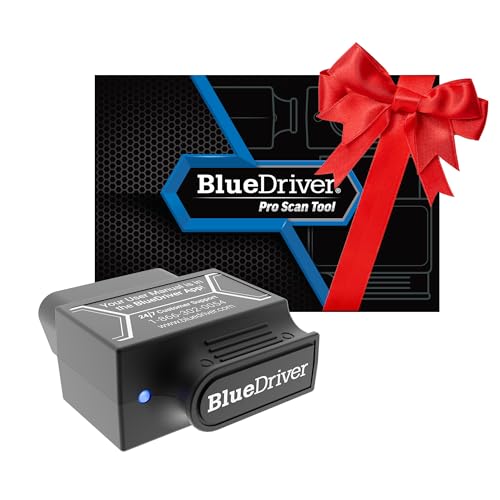
- Bluetooth OBD2 adapter: A pairing-friendly adapter lets an Android phone connect quickly and reliably. View on Amazon
- Wi-Fi OBD2 adapter: Useful if your app works over Wi-Fi and your phone’s Bluetooth is busy. View on Amazon
FAQ
Will an obd2 scanner for android work on every car?
Any car sold in the US from 1996 onward should support OBD2, but some older or specialty vehicles use manufacturer-specific protocols that generic apps cannot read fully. Check the app’s supported vehicle list before buying.
Does the adapter drain my car battery?
Most adapters draw very little current while the ignition is off, but some drain the battery if left plugged in for days. Unplug it when you are finished, especially on cars that sit for long periods.
Can I fix the problem just by clearing the code?
Clearing a code only removes the warning light temporarily. If the underlying fault remains, the code will return, so diagnose the cause first. If you are unsure, consult a qualified mechanic.
Conclusion
With a compatible adapter and a reliable app, an obd2 scanner for android gives you real diagnostic information in minutes. Record codes before you clear them, use freeze frame and live data to narrow the cause, and confirm the repair before you assume the problem is solved. For more model-specific guidance, see the OBD2 Scanners and Code Readers: What They Can and Cannot Tell You article.
Related reading
- Xtool D5S OBD2 Scanner: How to Read and Clear Car Codes at Home
- Wireless Bluetooth OBD2 Scanner: How to Pick and Use One at Home
- Toyota Corolla OBD2 Scanner: How to Read and Clear Codes at Home
- Obd2 Scanner with Throttle Relearn: Step-by-Step Guide for Home Mechanics
Ready to choose one?
About Lauren Holland
Lauren Holland is part of our editorial team and reviews and edits our car care & garage supplies guides, checking product details against manufacturer specifications and owner feedback.