 By Lauren Holland
Updated November 2026
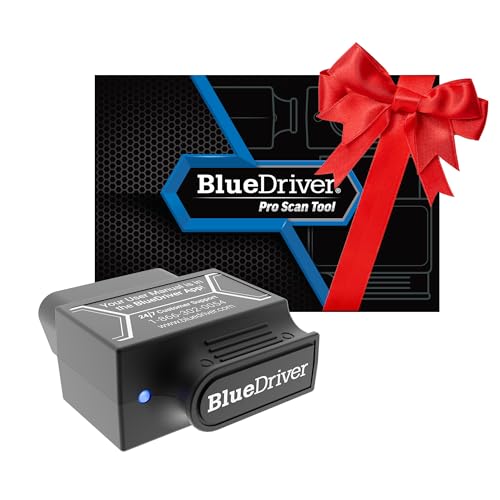
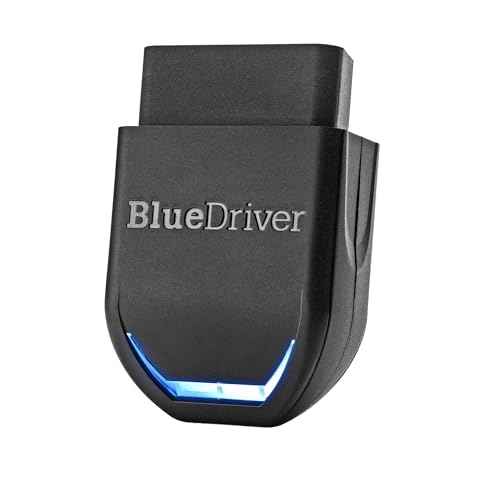
The bluedriver pro next-gen obd2 scanner is a Bluetooth-based diagnostic tool that pairs with a smartphone app to read engine codes, view live sensor data and check emissions readiness. This guide walks you through setup, reading and clearing codes, and interpreting results so you can decide whether a repair is a simple fix or a job for a shop. If you want more background, see BlueDriver Bluetooth Professional OBD2 Scanner: Read and Clear Codes in 5 Steps.
Before You Start: Set Up the Scanner
Start with the car off and the key out of the ignition. Locate the 16-pin OBD2 port, which is usually under the dashboard on the driver’s side, within about 2 feet of the steering column.
Shopping for one? See our guide: 3 Best OBD2 Scanners for Nissan Rogue Compared (2026).
- Plug the scanner firmly into the port until it seats fully.
- Turn the ignition to the “on” position without starting the engine so the vehicle’s computer powers up.
- Download the companion app on your phone and enable Bluetooth.
- Open the app, select your vehicle or enter the VIN, and confirm the connection.
If the app cannot find the scanner, check that the ignition is on and that no other device is already paired to it.
Reading Trouble Codes Step by Step
Once connected, run a full system scan rather than only the engine module. Many faults that trigger the check engine light are stored in other modules, including transmission, ABS and airbag systems.
- Note every code exactly as displayed, including the letter prefix (P for powertrain, B for body, C for chassis, U for network).
- Record whether each code is “active” (present now) or “pending/history” (intermittent or previously set).
- Check the freeze-frame data, which shows engine speed, coolant temperature and load at the moment the fault was stored.
Write everything down before clearing anything. Clearing codes erases freeze-frame data and resets readiness monitors. We also found Motopower MP69033 OBD2 Scanner: Read and Clear Codes at Home useful on this point.
Using Live Data to Find the Cause
A code tells you which circuit reported a problem, not always which part failed. Live data lets you watch sensors in real time, which is where the scanner earns its keep.
- Start the engine and let it reach normal operating temperature.
- Select the live data view and pick the sensors related to your code, such as oxygen sensor voltage or fuel trim.
- Compare readings at idle and at a steady 2,500 RPM. Look for values that jump, stay flat or sit outside the range your service manual specifies.
Fuel trim values that stay above about +10% or below about -10% often point to a vacuum leak, a dirty mass airflow sensor or a fuel delivery problem, though you should confirm with a physical inspection.
Clearing Codes and Checking Readiness
Clear codes only after you have repaired the cause, or you will lose the information you need to diagnose it. After clearing, the monitors reset and need a drive cycle, typically several days of mixed city and highway driving, before the readiness tests complete. This matters if you are preparing for an emissions inspection.
Common Mistakes
- Clearing codes before writing them down, which erases the freeze-frame clues.
- Replacing a part based on the code description alone without checking wiring and connectors first.
- Ignoring pending codes, which often become confirmed faults within a few drive cycles.
- Assuming a cleared light means a fixed car. The fault returns if the cause remains.
- Leaving the scanner plugged in while driving, which can drain the battery over time.
Recommended gear
- A digital multimeter lets you verify sensor voltage and wiring continuity after the scanner points you to a circuit. View on Amazon
- A basic OBD2 extension cable helps reach the port in tight dash layouts without straining the connector. View on Amazon
- A small battery maintainer keeps the battery charged if you run diagnostics over several days in a garage. View on Amazon
FAQ
Will the bluedriver pro next-gen obd2 scanner work on all cars?
It works with most vehicles sold in the US since 1996, which are required to use the standard OBD2 port. Some manufacturer-specific systems, such as certain body or chassis modules, may show limited data.
Can I use it to check codes without a computer?
Yes. The scanner pairs with a smartphone, so a phone is all you need for reading and clearing codes.
Should I clear a code before going to a mechanic?
No. Leave the codes in place so the technician can see freeze-frame data and pending faults. Mention what you have already checked.
Conclusion
With the scanner connected, you can read codes, check live sensor data and confirm whether a fault is active or intermittent. Record everything before clearing, and verify each suspected part with a physical test. For safety-related systems such as airbags or brakes, consult a qualified professional before doing repairs.
Related reading
- Xtool D5S OBD2 Scanner: How to Read and Clear Car Codes at Home
- Wireless Bluetooth OBD2 Scanner: How to Pick and Use One at Home
- Using an OBD2 Scanner: Read Your Car's Codes in 5 Simple Steps
- Toyota Corolla OBD2 Scanner: How to Read and Clear Codes at Home
- Scanner Bluetooth ELM327 OBD2: How to Pick and Use One at Home
Ready to choose one?
About Lauren Holland
Lauren Holland is part of our editorial team and reviews and edits our car care & garage supplies guides, checking product details against manufacturer specifications and owner feedback.