 By Lauren Holland
Updated November 2026
Finding the best OBD2 scanner for Android comes down to a few practical questions: does the adapter pair reliably with your phone, does the app read the systems you care about, and will it clear codes without fuss? This guide compares six Bluetooth adapters that work with Android phones and tablets. Each one was judged on published specifications, brand reputation, the range of supported vehicles and the patterns owners tend to report about pairing, app stability and code coverage.
Our top picks at a glance
- 1
 TOP CHOICEBest overallVeepeak OBDCheck BLE Bluetooth OBD II ScannerView on Amazon
- 2
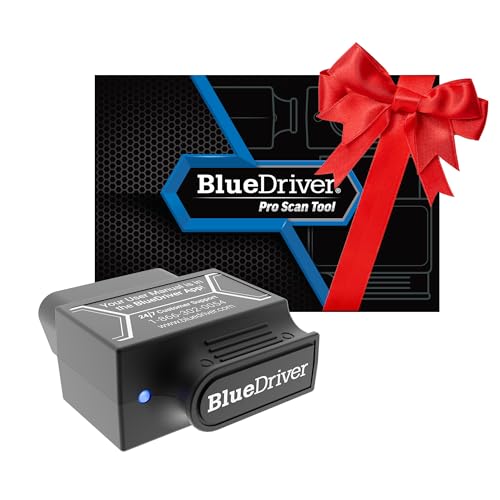
 TOP CHOICEBest for ABS and SRS diagnosticsBlueDriver OBD2 Scanner BluetoothView on Amazon
- 3
 TOP CHOICEBest for enthusiasts who want live dataOBDLink MX+ OBD2 Bluetooth ScannerView on Amazon
- 4
 Best budget pickPanlong OBD2 Scanner Bluetooth Car OBDII Code ReaderView on Amazon
- 5
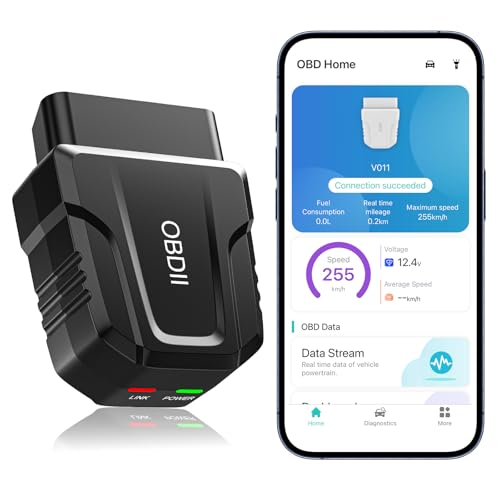 Best for newer Bluetooth 5 phonesOBD2 Scanner Diagnostic Tool, Bluetooth 5.4View on Amazon
- 6
 Best for app flexibilityOBD2 Bluetooth Scanner Car Code Reader for iOS, Android and WindowsView on Amazon
Our Top Picks
Quick Comparison
| Product | Best for | Key feature |
|---|---|---|
| Veepeak OBDCheck BLE | Most Android owners | Bluetooth Low Energy connection |
| BlueDriver OBD2 Scanner | ABS and SRS diagnostics | Repair reports and no subscription |
| OBDLink MX+ | Live data and enthusiasts | Fast, stable Bluetooth link |
| Panlong OBD2 Scanner | Budget-conscious drivers | Code reading and clearing |
| OBD2 Scanner Diagnostic Tool (Bluetooth 5.4) | Newer Android phones | Bluetooth 5.4 support |
| OBD2 Bluetooth Scanner Car Code Reader | Users of third-party apps | Compatibility with Torque and similar apps |
Veepeak OBDCheck BLE Bluetooth OBD II Scanner
Veepeak OBDCheck BLE Bluetooth OBD II Scanner for iOS & Android, Car Wireless Check Engine Light Code Reader Diagnostic Tool
Best for: Most Android owners who want a dependable everyday code reader.
This adapter suits drivers who want a simple plug-in tool to check the engine light, read generic codes and monitor a handful of live sensors from a phone. It is a common choice for people new to OBD2 work.
Key specs
- Bluetooth Low Energy connection
- Works with OBD II compliant vehicles (1996 and newer in the US)
- Compatible with iOS and Android apps
Pros
- Low-energy connection is gentle on phone battery
- Broad app compatibility
- Compact enough to leave plugged in or move between cars
Cons
- Advanced bidirectional tests are limited compared with professional tools
- Some owners report needing to re-pair after phone updates
Bottom line: A strong starting point for Android users who mainly need to read and clear codes at home.
View on AmazonBlueDriver OBD2 Scanner Bluetooth
BlueDriver OBD2 Scanner Bluetooth, No Subscription, ABS SRS TPMS | OBDII Diagnostic Scan Tool, Car Scanner & Code Reader, iPhone & Android, Check Engine, Repair Reports, Vehicles 1996+
Best for: ABS and SRS diagnostics, plus repair-oriented reports.
This model is aimed at drivers who want more than generic engine codes. Its listing highlights ABS, SRS and TPMS coverage, which makes it useful when a warning light is tied to braking or airbag systems.
Key specs
- Reads ABS, SRS and TPMS systems
- Covers vehicles from 1996 onward
- Works with iPhone and Android
Pros
- Goes beyond engine codes into chassis and airbag systems
- No subscription fee for core functions
- Repair report feature helps with follow-up research
Cons
- Costs more than basic code readers
- Full feature set depends on the companion app
Bottom line: Best for Android drivers who need ABS and airbag coverage in one adapter.
View on AmazonOBDLink MX+ OBD2 Bluetooth Scanner
OBDLink MX+ OBD2 Bluetooth Scanner for iPhone, Android, and Windows
Best for: Live data and enthusiasts who want a fast, stable connection.
The OBDLink line is widely discussed among enthusiasts for consistent communication and broad protocol support. It fits drivers who want to graph sensor data, monitor fuel trims or work with performance apps.
Key specs
- Supports Android, iPhone and Windows
- Works with many OBD2 apps
- Bluetooth connection for wireless use
Pros
- Strong reputation for reliable live data streams
- Works with a wide range of diagnostic apps
- Good choice for multi-platform households
Cons
- Requires a compatible app to get the most out of it
- Can be more than casual users need
Bottom line: A good pick for enthusiasts who value consistent live data over the simplest setup.
View on AmazonPanlong OBD2 Scanner Bluetooth Car OBDII Code Reader
Panlong OBD2 Scanner Bluetooth Car OBDII Code Reader for Android | Wireless Diagnostic Scan Tool, Read Live Data, Clear Error Code, Turn off Check Engine Light
Best for: A budget pick for basic code reading on Android.
This adapter targets drivers who want to read and clear engine codes without spending much. It is designed specifically for Android, which keeps the setup simple.
Key specs
- Bluetooth connection for Android
- Reads and clears engine codes
- Shows live data from supported sensors
Pros
- Affordable entry point for basic diagnostics
- Android-focused setup is straightforward
- Covers the core check engine light tasks
Cons
- Fewer advanced functions than premium adapters
- Owners sometimes report pairing quirks with newer phones
Bottom line: A sensible choice for occasional code checks when budget matters most.
View on AmazonOBD2 Scanner Diagnostic Tool, Bluetooth 5.4
OBD2 Scanner Diagnostic Tool, Car Scanner for iOS & Android, Bluetooth 5.4 | Code Reader for Cars and Trucks, Scanner for Check Engine Codes, Live Data, Error Clearing and Performance Test Exclusive A
Best for: Newer Android phones that support recent Bluetooth standards.
This adapter advertises Bluetooth 5.4 and a feature set covering codes, live data and performance testing. It suits owners with recent phones who want a modern connection.
Key specs
- Bluetooth 5.4 connection
- Reads codes, live data and clears errors
- Works with iOS and Android
Pros
- Modern Bluetooth standard for newer devices
- Covers codes, live data and error clearing
- Works across cars and trucks
Cons
- Bluetooth 5.4 benefits depend on your phone supporting it
- Performance test results vary by vehicle
Bottom line: Worth considering if your Android phone is recent and you want a current-generation connection.
View on AmazonOBD2 Bluetooth Scanner Car Code Reader for iOS, Android and Windows
OBD2 Bluetooth Scanner Car Code Reader for iOS, Android and Windows | Auto Car Diagnostic OBDII Adapter for Check Engine Lights, Compatible with Torque, OBD Fusion and Car Scanner Apps
Best for: Users who plan to run third-party diagnostic apps.
This adapter is built to work with popular apps such as Torque and OBD Fusion. It suits drivers who already have a favorite app and want hardware that plays well with it.
Key specs
- Compatible with Torque, OBD Fusion and Car Scanner apps
- Works on iOS, Android and Windows
- Reads and clears check engine codes
Pros
- Good compatibility with well-known apps
- Multi-platform support
- Useful for customizing dashboards and logs
Cons
- Some features require purchasing the companion app
- Setup can take a few extra steps for first-time users
Bottom line: A flexible option for Android users who want to choose their own app.
View on AmazonBuying Guide
Bluetooth Versus Wi-Fi Connection
Most Android users should choose a Bluetooth adapter. Bluetooth pairs directly with the phone and avoids the need to join a Wi-Fi network hosted by the adapter. Check whether the adapter uses classic Bluetooth or Bluetooth Low Energy, because your phone must support the same standard to pair.
Good picks for this: Veepeak OBDCheck BLE, OBD2 Bluetooth Scanner Car Code Reader
Protocol and Vehicle Compatibility
OBD2 became mandatory for most US passenger vehicles in 1996. Confirm your car is OBD2 compliant and that the adapter lists support for the protocols your vehicle uses. Owners of older or imported vehicles should check the listing before buying.
Good picks for this: BlueDriver OBD2 Scanner, OBDLink MX+
System Coverage: Engine Versus ABS and SRS
Generic code readers focus on engine codes. If your warning light relates to braking or airbags, look for an adapter that explicitly reads ABS, SRS or TPMS systems. Coverage varies widely, so read the feature list carefully.
Good picks for this: BlueDriver OBD2 Scanner, Veepeak OBDCheck BLE
Live Data and Sensor Support
If you want to graph coolant temperature, fuel trims or engine RPM, check that the adapter supports live data streaming and that your app can display it. Streaming speed matters more than people expect, so look for adapters with a reputation for stable communication.
Good picks for this: OBDLink MX+, OBD2 Scanner Diagnostic Tool (Bluetooth 5.4)
App Compatibility and Subscription Costs
Some adapters work only with a manufacturer app, while others support a range of third-party apps. Check whether core features are free, and whether extra functions require a subscription. Read the app requirements before purchase.
Good picks for this: BlueDriver OBD2 Scanner, Panlong OBD2 Scanner
Build Quality and Durability
The adapter lives in the OBD port under the dashboard, where it experiences heat, vibration and frequent plugging. Look for a sturdy housing and a connector that fits snugly. Keep the adapter unplugged when not in use to reduce wear and avoid draining the battery.
Good picks for this: OBDLink MX+, Veepeak OBDCheck BLE
Phone Compatibility and Bluetooth Version
Check your Android version and Bluetooth support before buying. Older phones may not pair reliably with newer Bluetooth standards. If pairing fails, verify that the phone’s Bluetooth settings allow the adapter and that location permissions are enabled for the app.
Good picks for this: OBD2 Scanner Diagnostic Tool (Bluetooth 5.4), Panlong OBD2 Scanner
FAQ
What is the best OBD2 scanner for Android?
There is no single answer for every driver. The Veepeak OBDCheck BLE suits most everyday users, BlueDriver fits drivers who need ABS and SRS coverage, and OBDLink MX+ is a strong choice for live data.
Do I need a subscription to read codes on Android?
Basic code reading is often free in companion apps, but some advanced features may require payment. Check the app listing for the features you need before buying.
Will an OBD2 Bluetooth adapter work with any Android phone?
Most adapters work with Android phones that support the matching Bluetooth standard. Older phones may not support Bluetooth Low Energy, so confirm compatibility before purchase.
Can an OBD2 scanner fix the check engine light?
A scanner reads and clears codes but does not repair the underlying fault. Clearing a code without fixing the cause usually means the light returns. Use the code as a starting point for diagnosis.
Is it safe to leave an OBD2 adapter plugged in?
Most adapters draw little power, but leaving one plugged in for long periods can slowly drain the battery on some vehicles. Unplug it when you are not using it. If you have concerns about electrical work, consult a qualified automotive technician.
What is the difference between generic and enhanced codes?
Generic codes follow the standard OBD2 definitions and can be read by most adapters. Enhanced or manufacturer-specific codes often require a scanner with brand-specific support.
Conclusion
For most Android owners, the Veepeak OBDCheck BLE is a dependable starting point. Drivers who need ABS and airbag coverage should look at BlueDriver, while enthusiasts who want steady live data will value the OBDLink MX+. The budget Panlong adapter suits occasional checks, the Bluetooth 5.4 model fits newer phones, and the multi-platform code reader works well for people who already use a favorite third-party app.
Sources
- Information on vehicle emissions systems and the role of OBD2 diagnostics (epa.gov)
- Vehicle safety guidance on warning lights and recall lookups (nhtsa.gov)
- Standards for on-board diagnostic communication protocols
Related reading
- Obd2 Scanner for Android: How to Pair One and Read Codes in 6 Steps
- Obd2 Scanner App Android: Read Car Codes on Your Phone in 5 Steps
- OBD2 Scanner Bluetooth Android: Pair and Read Codes in 6 Steps
- Best Obd2 Scanner with Abs and Srs: A Practical Guide (2026)
- Best Obd2 Scanner Honda: How to Pick One and Read Codes at Home
- Best OBD2 Scanners and Code Readers for DIY Drivers
About Lauren Holland
Lauren Holland is part of our editorial team and reviews and edits our car care & garage supplies guides, checking product details against manufacturer specifications and owner feedback.