By Lauren Holland
An OBD2 scanner for Mercedes-Benz lets you read the fault codes stored in your car’s engine and emissions computers, see live sensor data, and clear codes after a repair. This guide walks you through choosing a compatible scanner, connecting it correctly, interpreting what it reports, and knowing where a basic code reader stops being useful. Most Mercedes-Benz models sold in the US from 1996 onward use the standard OBD2 port, so the main challenge is understanding the codes and the car’s limits, not the hardware itself.
Why Mercedes-Benz Owners Need a Scanner That Goes Beyond Generic Codes
A generic OBD2 reader pulls codes defined by the SAE and the manufacturer-neutral P0, P1, P2 and P3 standard. That covers the engine, transmission and emissions systems well. Mercedes-Benz vehicles, however, also run many modules that a basic reader ignores: airbag (SRS), ABS and ESP braking, Airmatic or air suspension, steering assist, climate control, and the Comand or infotainment unit. Those faults are stored in their own control modules and usually need a scanner with manufacturer-specific support or a Mercedes-capable software platform.
Before buying, decide which jobs you actually have. If you mainly want to see why the check engine light is on, a standard reader is enough. If you also want to diagnose a warning on the instrument cluster for brakes, suspension or airbags, look for a tool that advertises Mercedes-Benz brand coverage. For background on what any reader can and cannot reach, see OBD2 Scanners and Code Readers: What They Can and Cannot Tell You.
Choosing an OBD2 Scanner for Mercedes-Benz
Scanners fall into three practical groups. Each suits a different kind of owner.
- Basic code readers: Read and clear powertrain (P-code) faults, show freeze-frame data and monitor status. Good for simple engine checks.
- Enhanced scanners: Add live data graphing, ABS, SRS and transmission modules, and sometimes oil-service resets. These are the usual choice for a Mercedes owner who wants more than the engine light.
- Dealer-level tools: Full module programming and coding, typically using Mercedes’s own diagnostic software or a compatible multi-brand platform. These are for advanced users and independent specialists, and they carry real risk if used carelessly.
When comparing options, check these points:
- Explicit Mercedes-Benz support listed by the manufacturer, not just “OBD2 compatible.”
- Coverage of ABS, SRS, transmission and body modules, if you need them.
- Live data with graphing, so you can watch sensor values under load.
- Updates available for new model years and software revisions.
- Bluetooth or Wi-Fi connection to a phone app, if you prefer that to a handheld unit.
For a broader comparison of readers suited to home garages, see Best OBD2 Scanners and Code Readers for DIY Drivers. For a general framework that also applies to these tools, see How to Evaluate Tire Inflators, Gauges, Battery Maintainers and Scanners.
Step-by-Step: Connecting and Reading Codes
Step 1: Find the diagnostic port
On most Mercedes-Benz models the 16-pin OBD2 port sits under the dashboard on the driver’s side, near the steering column or the lower panel above the pedals. Some older models have it in the center console area. Check your owner’s manual if you cannot locate it quickly.
Step 2: Prepare the car
- Turn the ignition to the “on” position without starting the engine, or start it if you need live data.
- Make sure the battery voltage is healthy. A weak battery can cause false communication errors.
- Have a notepad or phone ready to record every code exactly as displayed.
Step 3: Select the right module
Choose “Engine” first. Then, if you have a multi-module scanner, check ABS/ESP, SRS (airbag), transmission and body control. A warning light on the dash often points to a specific module, so start there.
Step 4: Record, then research
Write down each code and any freeze-frame data, which shows conditions at the moment the fault was stored: engine speed, coolant temperature, load and fuel trim values. Look up the code in a Mercedes-specific source before replacing parts. A single code can point to several causes.
Step 5: Clear codes only after diagnosis
Clearing a code turns off the warning light and erases the freeze-frame data. Do this only after you have recorded everything, and only after the repair is complete. If the fault returns, the system will set it again.
Reading the Results: A Quick Reference
| Code type | What it usually means | First check |
|---|---|---|
| P0300–P0308 | Engine misfire, random or specific cylinder | Spark plugs, coil packs, vacuum leaks |
| P0171 / P0174 | System too lean, bank 1 or 2 | Intake leaks, MAF sensor, fuel pressure |
| P0420 | Catalyst efficiency below threshold | Confirm oxygen sensor readings before replacing the converter |
| P0455 / P0456 | Evaporative system leak | Fuel cap seal, purge valve, hoses |
| C-codes (chassis) | ABS or ESP fault | Wheel speed sensors, wiring, brake fluid level |
| B-codes (body) | SRS or comfort system fault | Connectors, module power, recent repairs |
Treat this table as a starting point. The same code can have different causes on different engines, and Mercedes-Benz sometimes uses manufacturer-specific codes that generic lists do not cover.
Using Live Data to Confirm a Diagnosis
Live data shows what sensors report while the engine runs. It is the most useful tool for separating a failed part from a healthy part with a bad signal. Useful parameters include:
- Short-term and long-term fuel trims (ideally within roughly ±10%)
- Oxygen sensor voltage switching, both upstream and downstream of the catalytic converter
- Mass airflow reading at idle and under throttle
- Coolant temperature rising to normal operating range (typically around 80–100°C)
- Engine speed stability at idle
Record a graph or log while you drive, then compare the readings to the expected ranges in a service manual. Values outside the range suggest where to look, but they do not replace a physical test.
Common Mistakes to Avoid
- Replacing parts from the code alone. A P0420 code often points to a downstream oxygen sensor, not a dead converter.
- Ignoring the battery. Low voltage during a scan can produce misleading or missing module data.
- Clearing codes before recording them. You lose the freeze-frame information that often explains intermittent faults.
- Assuming a generic reader covers everything. Airbag, ABS and comfort faults may not appear without module-specific support.
- Coding or programming modules without knowing the procedure. Wrong coding can disable systems or cause real safety problems. Leave advanced coding to a qualified specialist.
- Driving with a safety warning lit. A flashing check engine light indicates an active misfire that can damage the catalytic converter. Reduce load and get it checked promptly.
Tips for Getting Reliable Results
- Scan the car twice: once with the engine off and once after a drive cycle, to catch both stored and pending faults.
- Note mileage, recent repairs and fuel quality, since these often explain a fault.
- Keep the scanner firmware updated before a diagnostic session.
- Check the diagnostic connector for bent or corroded pins if the scanner will not connect.
- Use a second opinion from an independent Mercedes-Benz specialist for safety systems or anything involving module replacement.
Recommended gear
A scanner handles the reading and clearing, but a few related tools make the diagnosis easier to complete.
- Enhanced multi-module OBD2 scanner: A scanner with ABS, SRS and transmission support is the most useful single tool for a Mercedes-Benz owner who wants to look beyond the engine light. View on Amazon
- Bluetooth OBD2 adapter with phone app: Good for graphing live data while you drive, and for saving logs to compare against service specs. View on Amazon
- Digital multimeter: Verifies sensor voltage and wiring continuity when a code points to a circuit rather than a part. View on Amazon
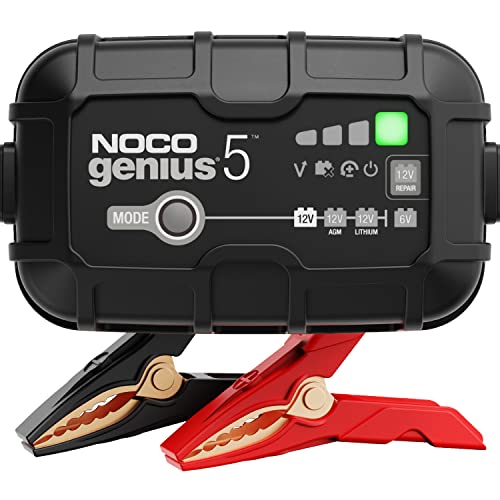
- Battery maintainer: Keeps voltage stable during long diagnostic sessions, which prevents communication faults caused by a weak battery. View on Amazon
FAQ
Does an OBD2 scanner work on every Mercedes-Benz?
Mercedes-Benz vehicles sold in the US from 1996 onward use the standard OBD2 connector, so any OBD2 scanner will physically connect. Engine and emissions codes are generally readable on all of them. Deeper module access, such as airbag and ABS, depends on the scanner’s manufacturer-specific support.
Can a basic scanner read airbag or ABS codes?
Usually not. Basic readers cover powertrain codes. ABS, SRS (airbag) and comfort modules often need an enhanced scanner or a platform with Mercedes-Benz module coverage.
Will clearing a code fix the problem?
No. Clearing a code only turns off the warning light until the system detects the fault again. The underlying problem still needs to be found and repaired.
Why does my scanner show “no communication” with the car?
Common causes include a blown fuse for the diagnostic port, a weak battery, a damaged connector, or a scanner that lacks Mercedes-Benz protocol support. Check the fuse and battery first.
Is it safe to leave the scanner plugged in while driving?
Plugged-in Bluetooth adapters that run in the background are generally fine, but some units can drain the battery if left connected with the engine off. Unplug it when you are not using it, and avoid operating a handheld scanner while driving.
Can I reset the oil service light with an OBD2 scanner?
Some enhanced scanners include a service reset function for Mercedes-Benz models. Basic readers typically cannot do this. Check the scanner’s listed functions before buying if this matters to you.
When should I take the car to a professional?
Take it to a qualified Mercedes-Benz specialist for airbag or steering faults, any module coding or replacement, brake system faults, or any warning you cannot resolve safely. Safety systems carry real risk if handled incorrectly.
Do I need a dealer-level tool for routine checks?
No. For engine codes, live data and most everyday checks, a mid-range enhanced scanner is sufficient. Dealer-level tools are needed mainly for programming and advanced coding.
Conclusion
An OBD2 scanner for Mercedes-Benz gives you real diagnostic power for engine and emissions faults, and an enhanced model extends that to the braking, airbag and comfort systems. Match the scanner to the faults you expect to face, record codes and freeze-frame data before clearing anything, and confirm each diagnosis with live data or a physical test. For anything touching safety systems or module coding, a qualified specialist is the right call.
About Lauren Holland
Lauren Holland is part of our editorial team and reviews and edits our car care & garage supplies guides, checking product details against manufacturer specifications and owner feedback.