By Lauren Holland
Updated November 2026
An OBD2 scanner for Audi lets you pull diagnostic trouble codes from the car’s onboard computers, see freeze-frame data, and decide whether a warning light is a loose gas cap or something that needs a shop visit. This guide walks through choosing a scanner that works with Audi’s systems, connecting it, reading and interpreting codes, and clearing them safely. Audis run on the same OBD2 standard as most cars sold in the US, but the manufacturer-specific modules behind the dash are where many generic tools fall short, so the details matter.
What an OBD2 Scanner Can and Cannot Do on an Audi
The OBD2 port sits under the dashboard on the driver’s side, usually near the steering column or above the pedals. Through it, a scanner reads the powertrain control module (engine and transmission) and, depending on the tool, other modules such as ABS, airbags, and the body control module. Generic scanners reliably read engine codes using the standard P-codes (for example, P0300 for a random misfire). Many Audi-specific faults are stored as manufacturer codes (P1xxx) or in non-engine modules that basic readers never query.
For a deeper look at what these tools can and cannot tell you, see OBD2 Scanners and Code Readers: What They Can and Cannot Tell You. The short version: a code is a starting point, not a diagnosis. A P0171 (system too lean) can come from a vacuum leak, a dirty mass airflow sensor, or a weak fuel pump, and the code alone won’t say which.
Choosing a Scanner That Works With Audi Systems
Not every OBD2 reader is equal for this brand. Before you buy, check for these features:
- Enhanced or manufacturer-specific code support: The tool should read Audi and VW Group modules, not only generic engine codes.
- Multiple module access: Look for ABS, airbag, transmission, and body control module reading.
- Live data streaming: You need to watch values like fuel trims, coolant temperature, and O2 sensor voltage in real time.
- Freeze-frame data: This shows the engine conditions at the moment a fault was stored.
- Readiness monitors: Useful before an emissions test, since clearing codes resets these.
- Software updates: Regular updates matter as newer Audi models add protocols.
Budget readers can handle basic engine codes, while a premium option will cover more modules and live data. The best OBD2 scanners and code readers for DIY drivers covers the general tradeoffs in more detail.
Step-by-Step: Reading Codes on Your Audi
Before you start
- Park on level ground, set the parking brake, and turn the ignition off.
- Note the warning lights on the dash and any symptoms (rough idle, hesitation, stalling).
- Have a notepad or phone ready to record every code exactly as displayed.
Connecting the scanner
- Locate the 16-pin OBD2 port under the dash.
- Plug the scanner in firmly. Most units power up from the port.
- Turn the ignition to the position where the dash lights come on, but leave the engine off for the first read.
- Select the vehicle manually or let the scanner auto-detect the VIN.
Pulling codes and freeze-frame
- Choose “Read Codes” or the equivalent option and wait for the scan to complete.
- Record each stored code, its status (current, pending, or history), and the description.
- Open freeze-frame data for each code. Note engine RPM, coolant temperature, load, and fuel trim at the moment the fault set.
- If the scanner supports it, check other modules, since an ABS or airbag code may explain a warning light the engine module doesn’t flag.
Reading Live Data to Confirm a Problem
Codes tell you where to look. Live data tells you what is happening now. Start the engine, let it reach operating temperature, and watch these values:
| Parameter | Typical reading (warm, idle) | What to look for |
|---|---|---|
| Coolant temperature | About 185–220°F | Readings that stay low suggest a stuck thermostat |
| Short-term fuel trim | Roughly -10% to +10% | Large positive values can point to a vacuum leak |
| Long-term fuel trim | Roughly -10% to +10% | Persistent large values suggest a longer-term fuel or air issue |
| Engine RPM at idle | Usually around 650–800 RPM | Unstable or hunting idle is worth checking |
Manufacturers specify exact values for each Audi model and engine, so confirm against the service information for your car when you can. Values in the table are general guidance only.
Clearing Codes Safely
Once you’ve recorded everything and addressed the cause, you can clear codes from the scanner’s menu. Do this only after the repair. Clearing a code before fixing the problem just resets the stored data and often causes the light to return. Note that clearing codes also resets the readiness monitors, so the car may fail an emissions test until the monitors complete their drive cycles again.
Some Audi faults, particularly those involving airbags, ABS, or steering, carry safety implications. If the code relates to those systems, have a qualified technician verify the repair. For anything involving brakes, airbags, or steering, consult a professional before driving the car in questionable condition.
Common Mistakes to Avoid
- Replacing parts based on the code description alone. A P0300 misfire can be a coil, plug, injector, or a vacuum leak.
- Ignoring non-engine modules. A generic engine-only reader can miss the actual cause of a warning light.
- Clearing codes before a repair. You lose the freeze-frame evidence you need to diagnose.
- Forgetting the readiness monitors. Clearing codes right before an emissions test usually results in a “not ready” fail.
- Driving with a flashing check-engine light. A flashing light usually indicates an active misfire that can damage the catalytic converter.
Tips for Better Results
- Take a photo of the dash warning lights and the code list before doing anything else.
- Check the battery voltage first. A weak battery can trigger codes that aren’t real faults.
- Look up the code in a current Audi-specific database, since generic descriptions sometimes differ from what the manufacturer means.
- Read codes again after a test drive to see whether a pending code has become confirmed.
- For a model-specific walkthrough, see OBD2 Scanner for Volkswagen: Read Codes and Fix Common Faults, since many Audi and VW platforms share modules and code structures.
Recommended gear
A scanner that reads Audi’s enhanced modules and shows live data is the core tool. A basic code reader is enough for simple engine checks, but it will not show what’s happening in the ABS or airbag systems.
- An enhanced multi-system OBD2 scanner with live data streaming helps you check engine and ABS modules together. View on Amazon
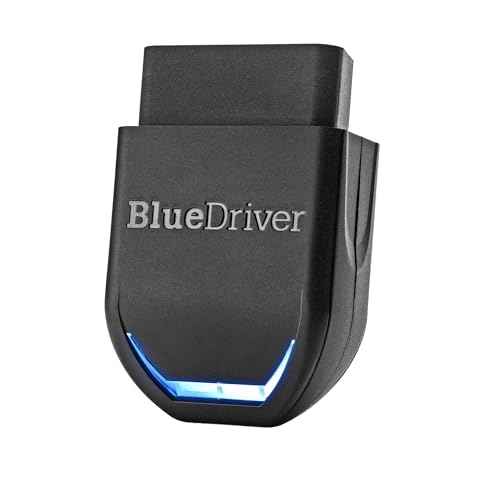
- A compact Bluetooth OBD2 adapter paired with a smartphone app lets you view live data while driving a test route. View on Amazon
- A basic handheld code reader is useful for quick engine checks at home. View on Amazon
For a broader comparison of scanner types, see How to Evaluate Tire Inflators, Gauges, Battery Maintainers and Scanners.
FAQ
Will a basic OBD2 scanner work on my Audi?
It will read standard engine codes on most Audi models sold in the US. It may not read ABS, airbag, or other module codes, and it may miss Audi-specific P1xxx codes.
Can I use an OBD2 scanner to reset the check-engine light?
Yes, a scanner can clear the light, but it only hides the stored fault. If the underlying problem remains, the light will return, and clearing codes also resets readiness monitors. If you want more background, see 5 Best Audi OBD2 Scanners: Top Picks Compared for DIY Drivers (2026).
Why does my Audi show a code but run fine?
Some codes are stored as pending on the first occurrence and only confirm after repeat trips. Others, like evaporative system leaks, affect emissions but not drivability.
Do I need to turn the engine on to read codes?
No. Codes can be read with the ignition on and the engine off. Live data requires the engine running.
What does a flashing check-engine light mean on an Audi?
A flashing light usually means an active misfire. Reduce engine load and have the car inspected soon, since continued driving can damage the catalytic converter.
Can a scanner tell me which part to replace?
No. A code points to a circuit or system. Confirm the cause with live data and testing before replacing parts.
Should I consult a professional for every code?
Not every code needs a shop. Simple fixes like a loose gas cap are fine to handle yourself. For safety systems, transmission problems, or any code you can’t confirm, consult a qualified technician.
Conclusion
An OBD2 scanner for Audi gives you a clear view of what the car’s computers are reporting, and it works best when you pair codes with freeze-frame data and live readings. Choose a tool that reads multiple modules, record everything before clearing, and verify repairs before resetting the system. Used carefully, a scanner turns a glowing dash light into a manageable diagnostic job.
Related reading
Ready to choose one?
About Lauren Holland
Lauren Holland is part of our editorial team and reviews and edits our car care & garage supplies guides, checking product details against manufacturer specifications and owner feedback.