 By Lauren Holland
Updated November 2026
An OBD2 scanner for Volkswagen Tiguan lets you read the diagnostic trouble codes that light up your dashboard, see what they point to, and clear them once the fault is fixed. The whole job takes about ten minutes with the engine off and the key in position. This guide covers how to connect the scanner, read and interpret codes, and avoid the mistakes that send people chasing the wrong part.
Before You Plug In
Tiguans from roughly 2009 onward use the standard 16-pin OBD2 port, located under the dashboard on the driver’s side, usually near the steering column or above the pedals. Some models have a small cover you can pull off. Make sure the ignition is off before you connect anything.
Shopping for one? See our guide: 3 Best OBD2 Scanners for Nissan Rogue Compared (2026).
Check the owner’s manual or the port location for your specific model year, since trim and generation can shift where the connector sits.
How to Read Codes on Your Tiguan
- Plug the scanner firmly into the 16-pin port until it seats fully.
- Turn the ignition to the “on” position without starting the engine. Wait for the scanner to power up and connect, which often takes a few seconds.
- Select the vehicle’s protocol if the scanner asks. Most Tiguans use CAN, so auto-detect usually works.
- Choose “Read Codes” or “Diagnostic Trouble Codes.” Note every code exactly as shown, including the letter prefix: P for powertrain, B for body, C for chassis, U for network.
- Check for pending codes as well as confirmed ones. Pending codes can reveal a fault before the check engine light comes on.
Interpreting Codes Before You Clear Anything
A code tells you which system reported a problem, not which part to replace. A P0300 random misfire, for example, could come from a worn spark plug, a failing coil, a vacuum leak, or low fuel pressure. Look up the code, then check live data for the cylinder or sensor in question.
Use the scanner’s freeze-frame data if it has it. This snapshot records engine speed, load, coolant temperature, and fuel trim at the moment the fault was stored, which helps you reproduce the problem.
For a deeper look at what different scanner types can and cannot show you, see OBD2 Scanners and Code Readers: What They Can and Cannot Tell You.
Clearing Codes and Confirming the Fix
Only clear codes after you have made a repair or verified the fault is intermittent. Clearing a code erases the freeze-frame data and resets readiness monitors, which can make a real problem harder to diagnose later.
After clearing, drive the Tiguan through a mixed cycle of city and highway driving over several days. If the code returns, the underlying issue is still present. Readiness monitors usually need a full drive cycle to complete, so a scanner showing “not ready” right after clearing is normal.
If your Tiguan needs a specific reset after a repair, such as a throttle or crankshaft relearn, the steps differ from a simple code clear. See Obd2 Scanner with Throttle Relearn: Step-by-Step Guide for Home Mechanics for that process.
Checking Common Tiguan Faults
| Code range | System | First thing to check |
|---|---|---|
| P0300 to P0304 | Misfire | Spark plugs, ignition coils, fuel injectors |
| P0171 or P0174 | Lean fuel mixture | Vacuum leaks, MAF sensor cleanliness |
| P0420 | Catalyst efficiency | Oxygen sensor readings, exhaust leaks before confirming catalyst failure |
| P0455 | Large EVAP leak | Fuel cap seal and hose connections |
These are starting points, not final diagnoses. Verify with live data before buying parts. For VW-specific fault patterns across several models, Obd2 Scanner for Volkswagen: Read Codes and Fix Common Faults goes into more detail.
Common Mistakes
- Clearing codes before writing them down, which removes the freeze-frame evidence.
- Replacing parts based on a code alone without checking live sensor data.
- Assuming a cleared light means the problem is fixed. Confirm with a drive cycle.
- Leaving the scanner plugged in while driving, which can distract you or drain the battery over time.
- Ignoring a flashing check engine light. A flashing light usually signals an active misfire that can damage the catalytic converter, so stop driving gently and get it checked.
Recommended Gear
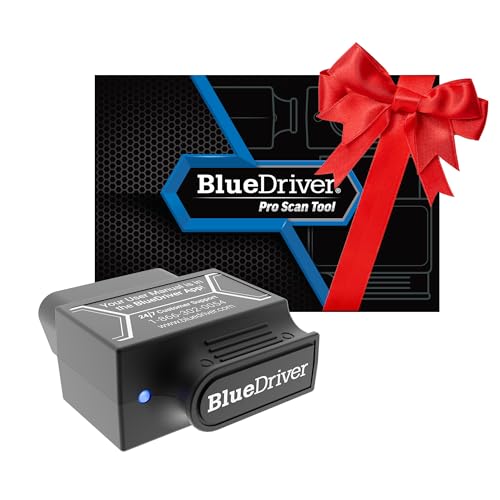
- A Bluetooth OBD2 adapter paired with a phone app lets you watch live data while driving a test route, which a basic handheld reader cannot show. View on Amazon
- A handheld code reader with freeze-frame support is the simplest option for reading and clearing codes in the driveway without a phone. View on Amazon
FAQ
Will an OBD2 scanner work on every Volkswagen Tiguan?
Most Tiguans from the mid-2000s onward support standard OBD2 for engine and emissions codes. Some systems, such as airbags, ABS, or the transmission, may need a scanner with extended manufacturer coverage to read fully.
Is it safe to clear a code myself?
Yes, clearing a code is a low-risk step if you have already fixed the fault or confirmed it is intermittent. If you are unsure what the code means, consult a qualified mechanic before clearing it.
Why did the check engine light come back after I cleared it?
The fault is still present, or the car has not yet completed the drive cycle needed to confirm it is repaired. Read the code again after several days of normal driving to see whether it returns.
Conclusion
An OBD2 scanner gives you a clear starting point for diagnosing your Tiguan, but the code is only the first clue. Record the data, verify it with live readings, and confirm the repair with a proper drive cycle. Work carefully, and when a fault involves safety systems or major components, consult a professional technician.
Related reading
- Wireless Bluetooth OBD2 Scanner: How to Pick and Use One at Home
- Toyota Corolla OBD2 Scanner: How to Read and Clear Codes at Home
Ready to choose one?
About Lauren Holland
Lauren Holland is part of our editorial team and reviews and edits our car care & garage supplies guides, checking product details against manufacturer specifications and owner feedback.