By Lauren Holland
Updated November 2026
A bidirectional OBD2 scanner does more than read trouble codes. It sends commands to your car, letting you switch on the cooling fans, cycle an ABS pump, or fire individual fuel injectors to see whether they respond. In this guide you will learn what separates a true bidirectional tool from a basic code reader, which features matter for home use, how to run your first output test safely, and how to pick a unit that fits the cars in your driveway. If you are new to the concept, our overview OBD2 Scanner With Bidirectional Controls: What It Does and How to Use It explains the basics before you shop.
What “Bidirectional” Actually Means
Most entry-level scanners are one-way. They request data from the engine control unit (ECU) and display it. A bidirectional scanner adds a second channel: it transmits control commands back to modules. Typical commands include activating a relay, running a component for a set time, or driving an actuator to a specific position. The practical result is that you can test a part before you spend money on it, which is the core reason home mechanics buy these tools.
Shopping for one? See our guide: 3 Best OBD2 Scanners for Nissan Rogue Compared (2026).
Bidirectional capability usually depends on the scanner’s software and its support for manufacturer-specific protocols, not just the OBD2 port itself. A device can speak the standard language and still be unable to command a particular brand’s body control module. Always check the supported-makes list before assuming a feature will work on your car.
Step 1: Decide Which Cars You Need to Cover
Bidirectional support is uneven across manufacturers. Generic OBD2 functions such as reading engine codes and live data work across nearly all post-1996 vehicles sold in the US. Bidirectional controls for ABS, airbag, transmission, and body modules often require brand-specific software. Make a short list of the vehicles you service most often, then check each scanner’s compatibility chart for:
- Engine and transmission control module commands
- ABS and brake module tests (bleeding, pump activation, solenoid tests)
- Body and comfort modules (windows, lights, door locks)
- Specialty functions such as electronic parking brake service or steering angle reset
If you work mostly on one brand, a dedicated tool often outperforms a universal unit. For example, owners of European cars frequently look at scanners built around a single make, and our guide to Obd2 Scanner for Bmw: How to Pick and Use One to Read BMW Codes covers what to look for in that case.
Step 2: Evaluate the Features That Affect Daily Use
Once you know the vehicles, compare the hardware and software on these points:
| Feature | Why it matters | What to look for |
|---|---|---|
| Actuation tests | Confirms whether a part responds before replacement | Named test list per module, not just a generic “test” button |
| Live data rate | Fast sampling helps catch intermittent sensor faults | Graphing with multiple parameters on screen |
| Module coverage | Determines whether you can test ABS, SRS, or transmission | Published list of supported systems per make |
| Software updates | New model years need new protocol data | Update path that does not require a paid subscription for basic use |
| Display and interface | Readability in a dim garage matters | Backlit screen or a companion app with clear menus |
Step 3: Prepare the Car Before Running Any Output Test
Bidirectional tests move real hardware, so preparation matters. Work through this checklist before you start:
- Park on level ground, set the parking brake, and chock the wheels if you will run the engine or drive any component.
- Confirm the battery is healthy. A voltage drop during a test can cause false results or reset modules. A battery charger keeps voltage stable for longer sessions.
- Read and record all stored codes first, so you know what the car reports before you command anything.
- Check the owner’s manual or service data for the specific test you plan to run and any required conditions, such as engine temperature or transmission in park.
- Keep hands, tools, and loose clothing clear of fans and belts.
Step 4: Run a Basic Actuation Test
A common first test is activating the radiator cooling fan. The sequence looks like this:
- Connect the scanner to the OBD2 port under the dash and turn the ignition to the on position without starting the engine, unless the test requires the engine running.
- Select the vehicle, then the engine or body module, then the bidirectional or actuation test menu.
- Choose the cooling fan test, follow the on-screen prompts, and listen for the fan to engage. Most scanners run a timed cycle, often under a minute.
- Watch live data during the test. Many tools display the commanded state next to the actual feedback, so you can see whether the relay responded.
- Stop the test when finished and confirm the component returns to normal operation.
If the fan spins but the scanner still reports a fault, the problem may sit in the wiring or the sensor rather than the fan itself. Use the test to narrow the search, then work through the diagnostic path for that code.
Interpreting Results
A successful actuation confirms that the command path and the component are functional. A failed actuation with no response may point to a blown fuse, a failed relay, or a broken circuit. Physically verify before ordering parts. Owners often report saving a replacement purchase after finding a seized fan or a loose connector during this kind of test.
Common Mistakes
- Buying a scanner based on the OBD2 logo alone. Bidirectional features depend on make-specific support.
- Running output tests with the car in gear or with the engine hot and unattended.
- Skipping the code read before testing, which makes it hard to tell whether the test changed anything.
- Ignoring software updates, then wondering why a new model year will not connect.
- Assuming a successful test proves the entire system is sound. An actuation only checks one part of the chain.
Tips for Getting the Most From Your Scanner
- Save a screenshot or log file of live data before and after repairs so you can compare readings.
- Keep a notebook of tests run on each vehicle, including the date and mileage.
- Check whether the scanner supports freeze-frame data, which shows conditions at the moment a fault was stored.
- Use a multimeter alongside the scanner when a test passes but the symptom persists.
- For a broader overview of tool types, see Best OBD2 Scanners and Code Readers for DIY Drivers.
Recommended gear
A stable power source matters during long tests, and a quality scanner needs a clear way to read live data while you work under the dash.
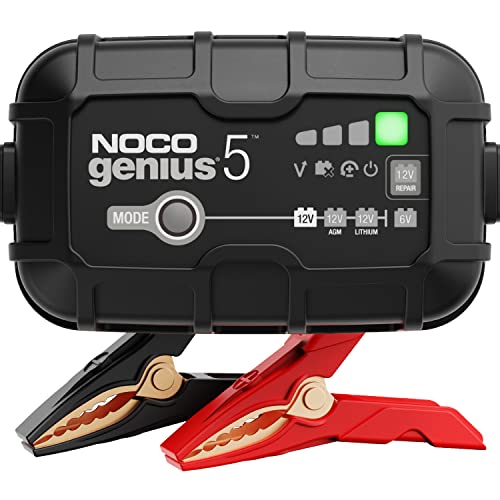
- Battery charger with maintenance mode: keeps system voltage steady during actuation tests and programming. View on Amazon
- Digital multimeter: confirms voltage and continuity at the connector when a scanner test passes but the circuit still seems to fail. View on Amazon
- OBD2 extension cable: lets you place the scanner where you can see the screen while reaching under the dash. View on Amazon
FAQ
Is a bidirectional scanner the same as a regular code reader?
No. A code reader only reads data and clears codes. A bidirectional scanner also sends commands to components so you can test them directly.
Can a bidirectional scanner damage my car?
Improper use can. Running components for long periods, testing with the engine hot, or commanding systems while the vehicle is in gear creates risk. Follow the scanner’s prompts and the service data for each test.
Do I need a subscription to use bidirectional features?
It depends on the tool. Some scanners include core functions at no extra cost but charge for advanced manufacturer modules. Check the terms before purchase.
Will a bidirectional scanner work on every car?
No. Support varies by make, model year, and module. Always check the compatibility list for your specific vehicle.
Can I program keys or modules with a bidirectional scanner?
Some advanced tools include key programming or coding functions, but these are not universal. Such work carries higher risk and often needs professional guidance. Consult a qualified technician for security-related procedures.
How is a bidirectional scanner different from a dealer tool?
Dealer tools generally offer the deepest coverage and manufacturer-level procedures. Consumer bidirectional scanners cover fewer modules but handle most common diagnostic and actuation tasks for home mechanics.
Do I need to know wiring diagrams to use one?
Not for basic actuation tests, but wiring diagrams help when a test fails and you need to trace the circuit. Service information from the manufacturer is the most reliable source.
Where should I start if I am a beginner?
Start with a basic read of codes and live data on your own car, then try one simple actuation test such as the cooling fan once you are comfortable with the menus.
Conclusion
The best bidirectional OBD2 scanner for your garage is the one that supports the makes and modules you actually service, with clear test menus and reliable updates. Prepare the car, read codes first, and run actuation tests methodically. Used this way, the tool turns guesswork into a short list of confirmed or ruled-out parts. For complex security, airbag, or safety-critical repairs, consult a professional technician.
Related reading
- Best OBD2 Scanner BMW: How to Choose and Use One on Your Car
- Toyota Corolla OBD2 Scanner: How to Read and Clear Codes at Home
- Obd2 Scanner with Throttle Relearn: Step-by-Step Guide for Home Mechanics
Ready to choose one?
About Lauren Holland
Lauren Holland is part of our editorial team and reviews and edits our car care & garage supplies guides, checking product details against manufacturer specifications and owner feedback.