By Lauren Holland
Updated November 2026
An OBD2 scanner with bidirectional controls does more than read trouble codes. It can send commands to your vehicle’s modules, telling a fan to spin, an injector to pulse or an ABS pump to cycle so you can confirm whether a part actually responds. This guide explains what bidirectional control means, how to run these tests step by step, and where the limits are, so you can diagnose small problems in your own garage with more confidence.
What Bidirectional Control Actually Means
Most basic code readers are one-way. They ask the engine control module (ECM) or other modules for stored codes and live sensor data, then display what comes back. A scanner with bidirectional controls, sometimes called active test capability, also sends instructions the other way. You select a component, and the scanner commands the module to energize it for a short period.
Common bidirectional functions include:
- Cycling cooling fans on or off
- Pulsing individual fuel injectors or ignition coils
- Activating the EVAP purge and vent solenoids
- Running ABS pump and valve tests
- Commanding the A/C compressor clutch
- Resetting service items such as oil life or electronic parking brake pads on some makes
The exact list depends on the vehicle and on how far the scanner’s software goes beyond the generic OBD2 standard. Generic OBD2 covers emissions-related data well, but many active tests are manufacturer-specific and require a scanner that supports enhanced protocols for that brand.
Check Compatibility Before You Buy or Use
Bidirectional capability is not a single feature you either have or lack. A tool may run active tests on engine and transmission modules but not on body or chassis modules. Before you start, confirm three things:
- Your vehicle is 1996 or newer in the US, since that is when OBD2 became mandatory for passenger cars and light trucks.
- The scanner’s manufacturer list includes your make and, ideally, your model year.
- The scanner specifically lists active tests or bidirectional control for your make. Generic wording is not enough.
If you are unsure, read the scanner’s coverage list before buying. For general background on how different scanner types compare, see Best OBD2 Scanners and Code Readers for DIY Drivers and OBD2 Scanners and Code Readers: What They Can and Cannot Tell You.
Preparing for an Active Test
Active tests move parts, and some run the engine or fans, so preparation matters. Gather the following before connecting:
- A level, well-ventilated space, with wheels chocked
- Parking brake set and transmission in park or neutral as the procedure requires
- A fully charged battery, or a battery maintainer if you expect long tests
- The vehicle’s service manual or the scanner’s on-screen test description
- Fire extinguisher within reach, and hands, hair and loose clothing clear of fans and belts
Start the engine only when the test specifically requires it. Many active tests work with the key on and engine off, which is safer and easier to observe.
Step-by-Step: Running Your First Bidirectional Test
Step 1: Connect and Read Codes First
Plug the scanner into the 16-pin diagnostic port, usually under the dash near the steering column. Turn the ignition to the on position without starting the engine. Read and record any stored or pending codes before running active tests. A code for the component you are about to command tells you where to focus, and a clean scan gives you a baseline.
Step 2: Open the Active Test Menu
Navigate to the module you want, usually the engine or ABS module, and select the active test or output test function. The menu lists each component the scanner can command. Read the on-screen instruction carefully, since some tests tell you to start the engine, hold the brake pedal, or wait a set time between commands.
Step 3: Run the Command and Observe
Select the component and trigger the test. Watch the part directly. Does the fan spin? Does the solenoid click? Listen for the characteristic sound of a relay or valve. If the part responds, the circuit from the module to the component is likely working. If nothing happens, the problem could be the part, its wiring, its fuse or relay, or the module’s driver circuit.
Step 4: Compare With Live Data
Many scanners let you view live data while the test runs. For a fuel injector pulse test, you can watch the change in engine RPM or the misfire count. For a fan test, watch coolant temperature and fan status parameters. Live data confirms the module received and acted on the command.
Step 5: Record and Interpret Results
Use the table below to narrow down likely causes when a test fails.
| What You Observe | Possible Cause | Next Check |
|---|---|---|
| Part responds to test | Circuit and component likely fine | Look elsewhere, such as sensor input or control logic |
| No response, no sound | Blown fuse, bad relay, open wire, or failed part | Check fuse, swap relay, test continuity at connector |
| Relay clicks but part stays off | Open or shorted wiring downstream, or dead part | Measure voltage and ground at the component |
| Test not offered on menu | Scanner lacks support for that module | Use manufacturer software or a professional tool |
Safety Limits and When to Stop
Bidirectional testing can turn fans on unexpectedly and can run pumps or valves that normally move only under specific conditions. Stop the test immediately if you see smoke, smell burning, hear grinding, or if a component behaves in a way the manual does not describe. Never run an active test on fuel system components near an open flame or while smoking. If a test involves brake or steering modules, consult a qualified professional before continuing, since a mistake there can affect vehicle control.
Common Mistakes
- Skipping the code scan. Running tests without knowing existing codes can send you chasing the wrong part.
- Assuming a passing test proves a good part. A part can respond to a command yet still fail under load or heat.
- Ignoring the test conditions. Many tests require specific engine temperature, gear selection or brake status. Skipping them produces misleading results.
- Running tests on a weak battery. Low voltage causes erratic behavior and false failures.
- Clearing codes before testing. Clearing erases freeze-frame data that helps you understand when a fault occurred.
Tips for Better Results
- Keep a notebook or phone note of each test, the result, and the live data values.
- Test a known-good component first if you have one, so you learn what normal behavior looks like on your vehicle.
- Cross-check with a wiring diagram before condemning a part. Connector pin voltage often reveals the problem faster than swapping components.
- Use the scanner’s help text for each test. It often lists exact conditions the manufacturer requires.
Recommended gear
A bidirectional scanner is the core tool, but a few supporting items make active testing easier and safer.
- Autel MaxiCOM MK808: A tablet-style scanner that supports a broad range of active tests on many makes, useful for owners who want more than basic code reading. View on Amazon
- Launch X431 V+ Pro: A full-function diagnostic tool with bidirectional control options on many domestic and import vehicles. View on Amazon
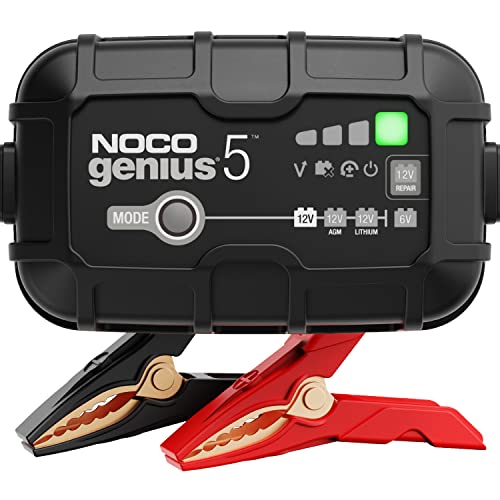
- NOCO Genius GENIUS5 battery maintainer: Keeps the battery at full voltage during longer tests so results are not skewed by low power. View on Amazon
- Digital multimeter: Lets you confirm voltage and continuity at a connector when a test fails, which the scanner alone cannot show. View on Amazon
FAQ
Is an OBD2 scanner with bidirectional controls safe to use at home?
Yes, for many common tests, provided you follow the on-screen instructions, keep hands clear of moving parts, and avoid running tests near fuel leaks or sparks. Brake, steering and airbag tests carry more risk and should be left to a professional if you are not experienced.
Do I need a bidirectional scanner to read codes?
No. Reading and clearing codes works with basic code readers. Bidirectional capability is useful when you need to confirm whether a specific component responds to a command.
Will bidirectional tests damage my engine or transmission?
When used as the manufacturer intends, active tests are designed to be safe. Problems usually come from ignoring test conditions or running commands at the wrong time. Stop any test that produces unusual noise or behavior.
Why does my scanner not show active tests for my car?
Most likely the scanner does not support that make, model year or module. Check the coverage list. Some tests require manufacturer-specific software that generic tools do not include.
Can I run bidirectional tests with the engine off?
Many can. Fan, solenoid and relay tests often work with the key on and engine off. Tests that depend on combustion, such as injector pulse with live RPM feedback, require the engine running.
What is the difference between an active test and a live data stream?
Live data is one-way: the scanner reads sensor values as they change. An active test is two-way: the scanner commands a component and then you observe the result, sometimes using live data to confirm.
Should I clear codes after a successful test?
Only after you have recorded the original codes and freeze-frame data. Clearing codes resets readiness monitors, which can affect emissions testing. Check local inspection rules before clearing.
When should I take the car to a professional?
Consult a qualified technician if tests point to a module failure, if brake or airbag systems are involved, or if you cannot confidently identify the cause after checking fuses, relays and wiring. Persistent or safety-related faults are better handled by someone with full factory information.
Conclusion
An OBD2 scanner with bidirectional controls lets you move from reading codes to testing whether parts actually respond. Confirm compatibility first, prepare the vehicle, and run tests in order while recording results. Used with a multimeter and a careful eye, it can save time and help you isolate small faults before they grow.
Related reading
- Obd2 Scanner for Volkswagen: Read Codes and Fix Common Faults
- Obd2 Scanner for Bmw: How to Pick and Use One to Read BMW Codes
- OBD2 Scanner for Mercedes: How to Read and Clear Codes Yourself
- OBD2 Scanner for Mercedes-Benz: Read Codes and Fix Issues at Home
About Lauren Holland
Lauren Holland is part of our editorial team and reviews and edits our car care & garage supplies guides, checking product details against manufacturer specifications and owner feedback.